Latest entry
Chapter 009: Backgrounds, Meanie Variants, and Weather Warnings
2026-06-04
Level building, atmosphere, and spawner polish
Diary of a Game
A compact Unity side-scrolling delivery platformer about getting the package to the end of each route. This diary follows the project from early concept through prototype, level design, polish, WebGL build, and release.
Quick index
Jump straight to the newest Courier 16 update or browse the diary by chapter.
Latest entry
2026-06-04
Level building, atmosphere, and spawner polish
Entry index
Development log
These chapters follow Courier 16 from rough idea to playable release. Each one focuses on a decision, problem, milestone, or lesson from the build rather than acting as a raw changelog.
Focus: Giving the game a real starting point
Courier 16 started with a simple target: build a small Unity game from start to finish and document the process properly along the way.
Not a giant game. Not a forever project. Not one of those “small ideas” that quietly grows weapons, crafting, multiplayer, a skill tree, and a suspicious need for three more months. The goal here is much more useful: make a complete game with a clear scope, then write about the decisions, problems, fixes, and lessons as it comes together.
The current plan is a compact side-scrolling delivery platformer built around sixteen scrolling routes. The player is a courier, the job is to get a package to the end of each route, and the interesting part should come from movement, hazards, timing, and package handling. Somewhere between “box decoration” and “shipping label punishment” is probably the actual game.
The first actual Unity work was not glamorous, but it was important. I created the three usual scenes I like to start with: mainMenu, gamePlay, and gameOver. That gives the project a basic shape before any gameplay exists.
That is not much of a game yet, but it is the first proper checkpoint. The project exists. The basic scene structure is in place. The UI has somewhere to live. The first version has been pushed to git, which means there is a clean starting line instead of a pile of local files and false confidence.
The next job is to make the project format work before chasing mechanics. This diary needs to read more like a serialized making-of article than a plain developer notebook, so the page structure matters: chapters, screenshots, captions, notes, and eventually playable build links.
Focus: Getting the project synced, choosing a dev font, and laying out the first UI screen.
The day started with the laptop version of the repo not pulling down properly, which is always a charming way to begin. The scenes were missing, even though everything had pushed cleanly from the MacBook downstairs and the files were visible in the repo.
With a repo this small, I had no great emotional need to investigate the mystery in depth. I pulled a fresh clone instead, which worked. Hopefully that was a one-off oddity and not the start of some strange Git folklore where the MacBooks begin disagreeing about reality.
Since Courier 16 is not planned as a commercial release, and the repo will be available publicly, I am looking into using free assets where it makes sense. My artistic skill can currently be described as brick on a pile of bricks, so I am not going to pretend this project needs hand-painted visual mastery before it earns the right to exist. I may still attempt my own music and sound effects, because apparently I enjoy creating future problems with headphones on.
For development flow, I prefer working in a fairly linear way, so the first target is the mainMenu scene. Nothing fancy yet: title, Play, About, and Quit. It is not polished, and it is not supposed to be. It is there to give the project a front door instead of just throwing the player straight into a half-built level like a confused parcel.
This morning’s session was mostly base UI Toolkit work. I picked a development font, created the first pass at the menu layout, and got something visible on screen. I will be completely honest: ChatGPT helped with the USS and UXML files. One day I will properly sit down with UI Toolkit and go through the details like a responsible adult. Today was not that day.
The font I landed on for now is Luckiest Guy by Astigmatic . It may not survive to the final version, but it has the right chunky, playful energy for development. It also immediately reminded me that big personality fonts are great until they start shoving the layout around like they own the place.
While looking through fonts, I also ran into some really nice multi-colour examples. I thought fonts were still mostly monochrome creatures, but apparently that ship sailed while I was off doing something else. I asked ChatGPT how those colour fonts worked from a screenshot and got the usual five-page answer, so that can wait until after a cup of tea or five.
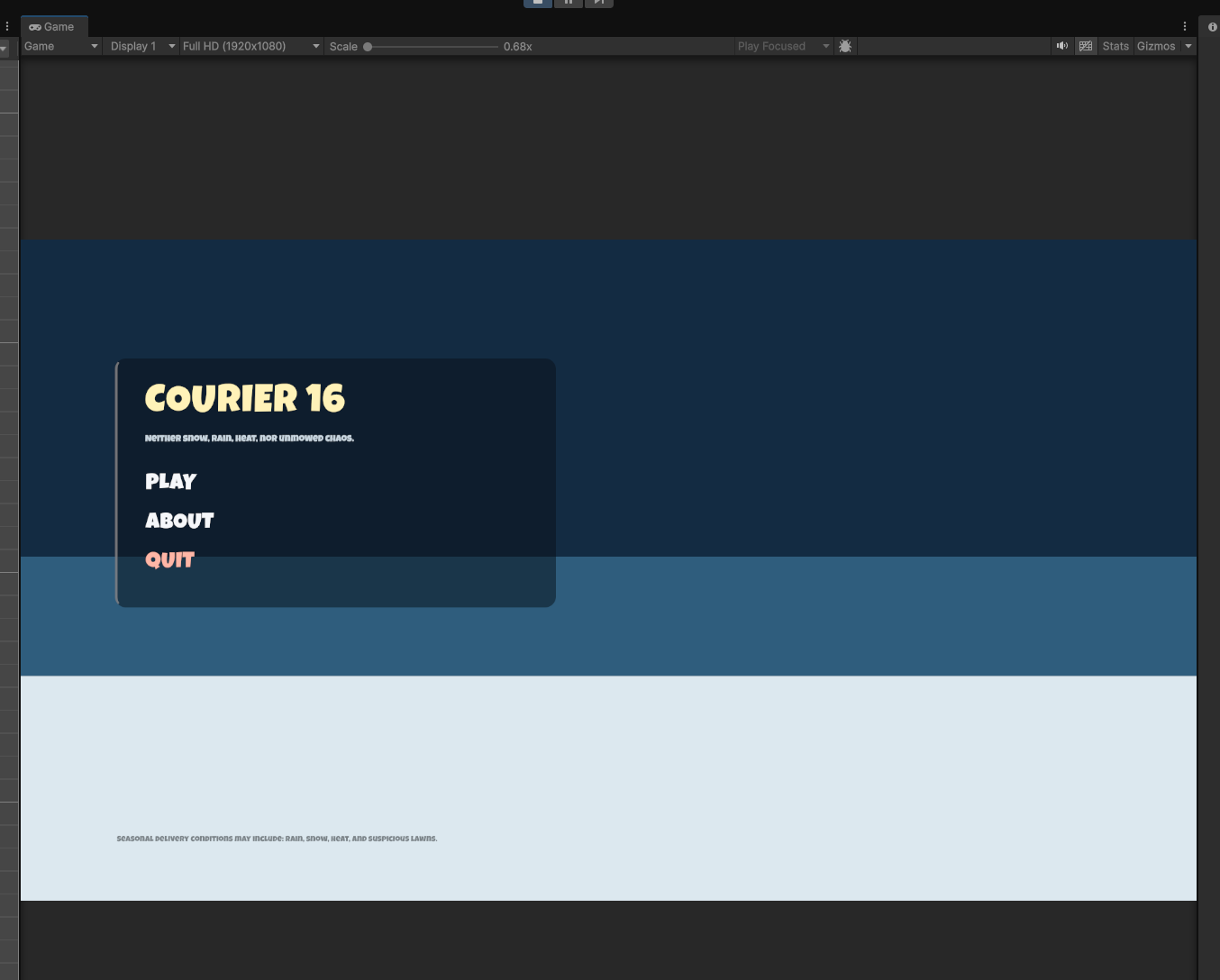
After a bit of playing around, AI and I got a workable mainMenu laid out. I already have ideas for what this screen should eventually become, especially once there is actual gameplay art to sit behind it, but for pure function this does the job. There is a line of text sitting low on the screen, and I am not losing sleep over that yet.
The About button should eventually open a modal. The Quit button can quit desktop builds, while the web version may need to do something else entirely. Opening Google would be funny, but probably not the final answer. Probably.
Progress stopped there because I was distracted by Aussie Rules and State of Origin, which is not a bug, it is a scheduling feature. The menu exists, the font is in place, and the next step is obvious enough.
Focus: Getting the main menu working, sorting scene flow, and building the first gameplay UI.
This morning’s session was on a slightly tighter schedule, so the goal was to keep things practical: wire up the main menu, make sure the game can actually move between scenes, and get the first pass of the gameplay HUD on screen.
Naturally, that started with me forgetting to add scenes to the Build Profile. Twice. That caused the gamePlay scene to refuse to load, which is the sort of problem that feels mysterious for about thirty seconds and then immediately turns into “yes, that was obviously me.” Once the scenes were actually included where they needed to be, things behaved properly.
A quick focus assignment to the Play button also meant keyboard and controller navigation started working nicely in the mainMenu scene. That is enough for now. I am not especially worried about the About or Quit buttons yet. They react when clicked, which is all I need at this stage. One button gets the player into the game, and that is currently the important bit.
With the menu flow in place, the project has moved a little closer to feeling like a real game rather than a collection of scenes with ambitions. It also means I now have to think more seriously about the actual game pieces. I know broadly how I want Courier 16 to play, but as previously established, my artistic skill remains somewhere in the region of brick. Because of that, I am happy to lean on freeware art while I sketch out ideas and slowly figure out what the project really needs visually.
If I had not already said it clearly enough, this project is being built in Unity 6 using UI Toolkit and the New Input System. I do not see much point in retreating to older UI or input workflows unless the modern systems hand me a genuinely ugly defect later on. For now, the newer stack is doing what I need.
After a bit of digging around, I found a Kenney asset pack that should do the job for early development: New Platformer Pack . It is not perfect, but it is more than good enough to get the project moving while I work out gameplay and gradually design my own graphics.
The first pass of the gameplay UI is now in place. Score sits in the top left, lives sit in the top right, and the space between them is reserved for player notifications. That middle area is likely going to become one of the more personality-heavy pieces of the HUD. I am not going to give too much away yet, but weather warnings, delivery notices, and other little interruptions are very much on my mind.
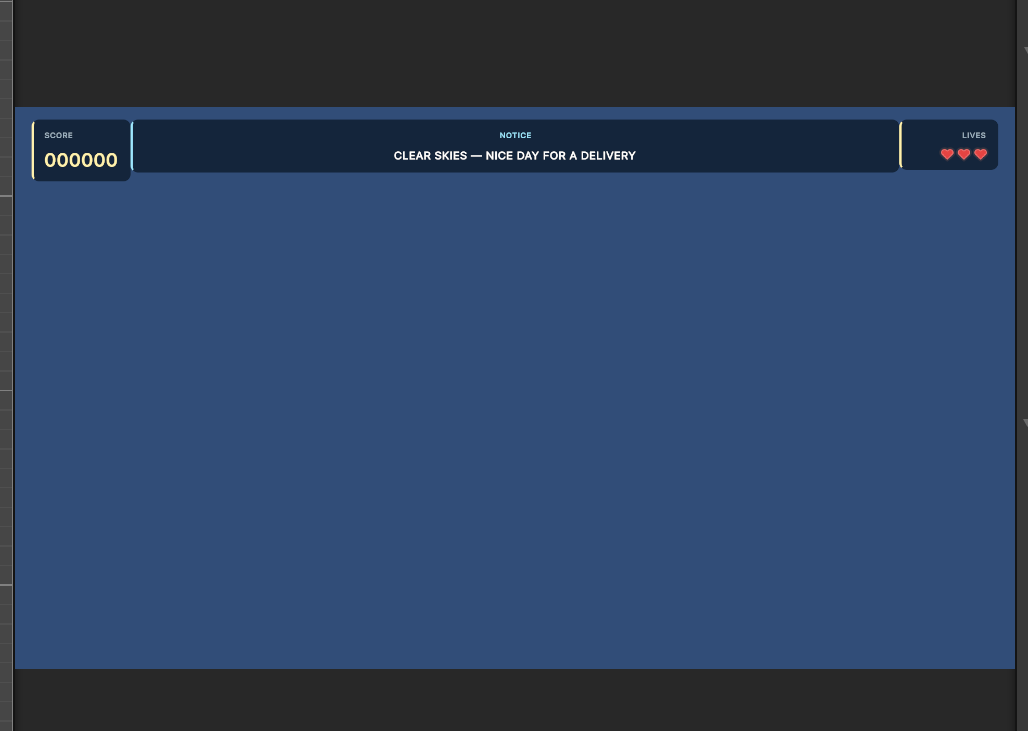
There is not a huge amount of visible complexity here yet, but this was still a useful session. The menu now leads somewhere, the scenes are connected, input is behaving, and the gameplay screen has a basic information structure. That is a decent return for a short morning, even if part of the process involved me forgetting where Unity expects its scenes to be listed.
That is enough for today. Coffee is calling, and once that happens the next obvious step is to start moving away from menus and into the actual game logic.
Focus: Creating the first real tilemap test area and getting the player moving on it.
While drinking tea at 03:30, I had one of those useful but slightly annoying realizations: most of my previous Unity games have been single-screen projects. Courier 16 is not supposed to be that. It needs scrolling levels, which immediately raises the question of how the levels should actually exist inside Unity.
Do I make a separate scene for each level? Do I unpack level data into the main gamePlay scene? Do I use prefabs, additive scenes, or some hybrid approach that sounds sensible right up until Unity starts clearing its throat? There are plenty of opinions out there, and naturally most of them disagree with each other.
For testing, the useful goal was simple: create a basic tilemap level, paint enough ground to stand on, and make sure the player does not immediately fall through the world like a dropped sandwich. It does not need to be Level 1 yet. It just needs to use the same sort of workflow the final game is likely to use.
The first headache was getting the tiles imported and usable. After that came the pixel-size problem. The tiles were 64x64, but the import settings were not matching that properly, so they did not sit correctly in the grid. Setting the Pixels Per Unit value to match the sprite size fixed it without too much drama.
Once the tilemap was behaving, I added a quick player sprite and gave it a Rigidbody2D and BoxCollider2D. For reasons best known to the collider goblins, Unity decided the box collider should start at roughly microscopic size. A quick edit fixed that, and the player finally dropped onto the ground instead of falling through it.
That was the first proper win of the morning. The tilemap had collision, the player had collision, and gravity was doing its job. The player hit the floor harder than a drunk guy on a dance floor, but at least the floor existed.
Next came the first movement script. This is using Unity 6, UI Toolkit, and the New Input System, and I have to admit I do like the newer input workflow. It is still Unity, so there is always a chance of ritual confusion, but compared to some input systems I have used over the years, this one feels fairly reasonable once the pieces are connected correctly.
The player can now move left and right, jump, land on platforms, and bump into walls. I had to increase jumpForce to 12f so the player could actually reach the test platforms, which is exactly why this kind of ugly test map matters. Numbers mean very little until they are attached to a jump you either can or cannot make.
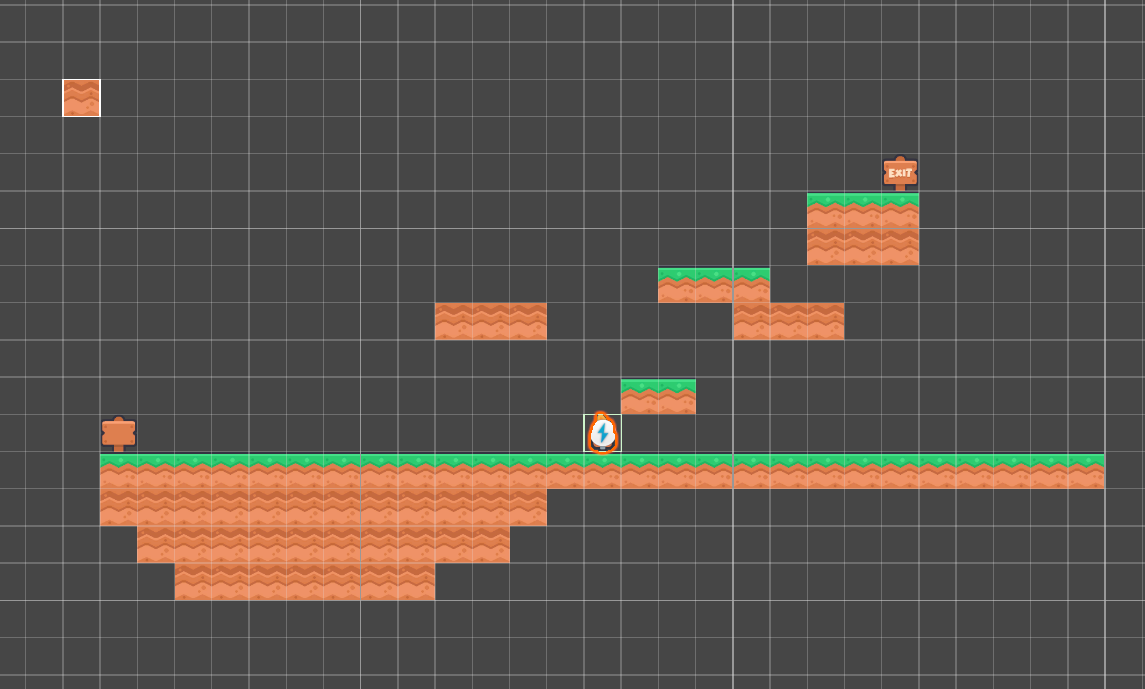
While testing, I kept trying to double jump. That probably says something useful. Double jump feels like one of those expected platformer features now, and for this game it could be a good way to make movement more fun without adding a whole new pile of systems. So that goes on the list.
I also noticed the player can occasionally get stuck against or underneath blocks. That is likely a collision box issue rather than a grand mystery. Platformer collision is usually less about perfectly matching the sprite and more about making the player feel like the game is being fair. The collider probably needs to be a little more forgiving.
That can wait until tomorrow. Today’s goal was simple: make a small environment where the player can move, jump, and collide with the world. That goal is done. It is not pretty, but it is real gameplay plumbing, and real gameplay plumbing beats imaginary polish every time.
Focus: Loading level_01 into the gameplay scene and getting the first playable test map visible in Game view.
The morning started with a bit of cleanup and organization. I imported more of the Kenney blocks into the Tile Palette and built a very small test level. Nothing fancy, but enough to start proving the workflow: terrain first, gameplay objects later.
I did briefly throw in a key and a button because they were sitting there looking useful, but that also made the next lesson fairly obvious. Those items do not really belong in the ground tilemap. Terrain is terrain. Pickups, buttons, locks, doors, and other interactive bits should become prefabs so they can have proper positioning, colliders, and scripts. The floating blue button was funny, but not exactly a professional design statement.
I will probably end up with multiple palettes: ground, hazards, decorations, and maybe a few visual layout helpers. I am not pretending I have a perfect tilemap workflow yet. Tilemaps are still new territory for this project, so what seems like a good idea today may turn into tomorrow’s cleanup job. That is the fun of learning, or at least what I tell myself while drinking tea at unreasonable hours.
The main goal today was getting the test level to display correctly inside the actual game. Up to this point I had mostly been playing around in Scene view, which is fine for building, but not where the player will live. The level scene itself has no camera, HUD, or gameplay systems. It is only the map. The gamePlay scene provides the camera, player, HUD, and the rest of the game shell.
Once the level was loaded into the gamePlay scene, I was honestly pretty pleased with how it looked. The sky colour needs work later, and background graphics will probably help, but the chunky tiles, simple platforms, and HUD already give it a nice retro feel. It is not final art, but it is finally starting to look like a game screen instead of a workshop accident.
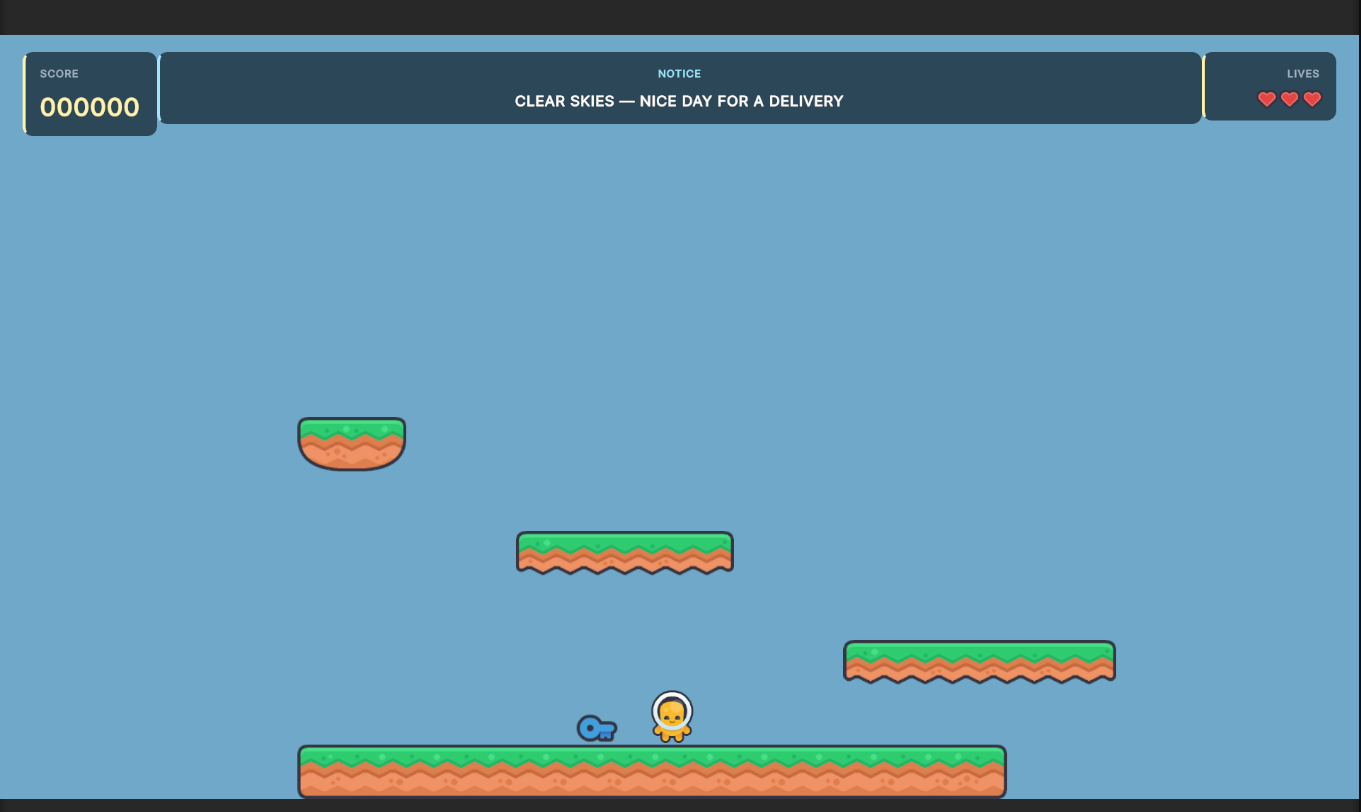
I also swapped the temporary player marker for something that at least looks more like a player. There are no animations yet, and I am not worried about that right now. A static player sprite is enough while the game loop is still being built. The priority is movement, pickups, events, hazards, meanies, and level flow. Fancy bits can wait. No point making the game look amazing if the gameplay underneath it is still held together with wishful thinking and biscuits.
The first LevelLoader script is not coding genius, and it does not need to be. It has one job: load the starting level scene additively. That gives me a working structure where gamePlay stays as the reusable gameplay shell while level_01 provides the actual map.
That immediately exposed the next architecture issue: the player should not live inside level_01. The player belongs to gamePlay, while the level should only say where the player starts. So I added a PlayerSpawn object to the level and adjusted the loading flow so the player starts disabled, gets moved to the spawn point, and then gets turned on.
That small change matters more than it sounds. Without it, the player appears in the middle of the screen and then magically snaps to the start position, which looks cheap even in a test build. Now the player stays out of sight while the level loads, then appears where the level says they should appear. Much cleaner.
There is still plenty of roughness here. The sky is flat. The level is tiny. The pickup does not do anything yet. The player collider still catches on terrain now and then. But the important structure is working: the gameplay scene loads the level, the camera renders it, the HUD stays visible, and the player starts from the level’s spawn point.
Focus: Cleaning up UI scaling, adding basic key collection state, and preparing the next gameplay systems for lock boxes, packages, and buttons.
After yesterday’s diary was published, the house was still asleep, the tea was still doing its job, and I had just enough quiet time to keep poking at Courier 16. This is how these things get you. You say you are done, then you see one more thing that could be cleaned up, moved, tested, or made slightly less awful.
I added a few more items to level_01 and continued playing around with the Kenney assets. Those packs are dangerous in the best possible way. You import a few blocks, spot a button, and suddenly your brain starts planning locks, mushrooms, signs, package routes, delivery points, and little bits of scenery that probably have no business being considered at four in the morning.
The test level is still not really Level 1 yet, but it is starting to move away from being a plain collision lab. There are platforms, pickups, lock-box ideas, and enough route shape to expose problems. That is useful. A rough level that reveals bad assumptions is far more valuable than a pretty screen that does nothing.
One thing that became obvious while testing was that the game needs some kind of fail boundary under the level. If the player falls off the map, they should not get the full Hans Gruber slow-motion death scene. They should hit a fail zone, lose a life or reset, and get back to the route. That is now on the list.
I also cleaned up the gameplay HUD because the original sections were slightly different heights, and once I noticed that, it started annoying me like a loose cupboard door. The HUD now behaves more like proper modules: score, notice, items, and lives. It is not final, but it is much cleaner.
The bigger UI issue turned out to be the Panel Settings asset. I had been building mostly on the 4K machine, then opened the project on the MacBook, and everything looked like it had been thrown into a UI blender. The culprit was Constant Physical Size. Switching the panel to Scale With Screen Size, with a 1920x1080 reference resolution, fixed both the main menu and the gameplay HUD. That was one of those fixes that feels small, but saves the project from future layout misery.
I also fixed the Luckiest Guy font issue on the main menu. The correct USS property was -unity-font-definition, not the property I was originally trying to use. Unity was happy enough to let me be wrong for a while, obviously. The gameplay HUD can keep its current font for now. It is readable, and readability matters more than style during testing.
During another quiet stretch, I created a few more prefabs, added double jump, and tried to reduce the problem where the player sometimes catches on platform edges. The double jump already feels useful for testing. The sticking issue is better after adding a zero-friction physics material, but it has not completely vanished. It is not bad enough to derail the morning, so it stays on the review list.
Monday morning started with a small goal: add collision detection, even if it only reported results to the Console. That is not exciting in the marketing sense, but it is exactly the kind of work the game needs right now. Before score, packages, locks, buttons, and meanies can matter, the game needs to reliably know when the player touched something.
The first proper interaction was coloured keys. The key pickup script now supports four colours: blue, green, red, and yellow. The player can collect them, the key disappears, and the game logs what was collected. That gave the project its first small piece of actual gameplay state.
That immediately led to the next design decision: how should the player interact with the world? Do we use one button for everything, switching between fire and action depending on context, or do we map separate buttons? It took about thirty seconds to remember we are not trapped in the 8-bit era anymore. The game can have a Fire button and an Interact button. Nobody wants to blast a meanie and accidentally have the game interpret that as, “please operate this nearby delivery machine.”
The current thinking is that keys open matching lock boxes, and lock boxes release the package or item that needs to be delivered. Some levels may be simple: avoid the meanies, grab the package, and reach the customer. Later levels can layer in coloured keys, buttons, package requirements, and delivery unlocks. The important part is that the systems are being built in a way that can grow without needing to be rewritten every time a new object appears.
That meant the next obvious piece was a tiny inventory system. Not a full RPG backpack. No slots, no menus, and no “you are carrying sixteen turnips and a ceremonial spoon.” Just enough state to answer simple questions: does the player have the blue key, the green key, the red key, or the yellow key?
Once the keys existed in inventory, the HUD needed to show them. Console logs are useful while building, but they are not a player interface. So the HUD now has a dedicated Items section. If the player has no keys or packages, nothing is shown. When keys are collected, their icons appear in the Items panel.
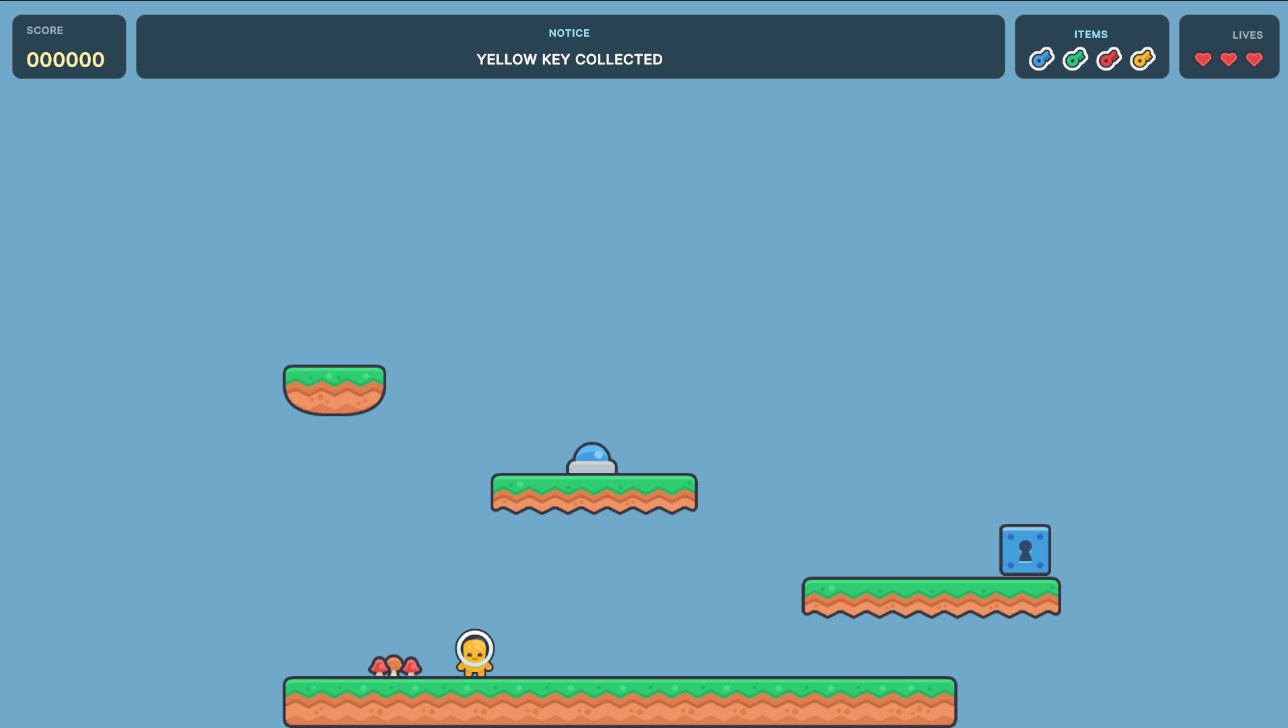
Getting that wired was more fiddly than it should have been. UI Toolkit needs the UIDocument to display the UXML, a controller script to find and update named elements, and then the player inventory needs a reference to that controller. It works, but the setup feels like plugging a kettle into a toaster through a fax machine. Scotch would not have been an unreasonable thought at 05:35.
Still, it works. The player collects keys, the inventory records them, the HUD displays them, and the notice area remains free for gameplay messages. That is a proper little foundation. Tomorrow’s fun should be opening the lock box. In very technical terms: are you the Keymaster? If yes, open the box and get the package.
Focus: Completing the pickup-to-delivery loop, adding camera follow, spawning moving meanies, and wiring the first level death zones.
Well, yesterday evening proved productive. It was quiet, with YouTube running in the background, so I went ahead and completed the pickup-to-delivery flow for items.
I was expecting some headaches, but outside of forgetting that the default Input System setting for Interact was holding the button for 0.5 seconds, nothing really went pear-shaped. The interact issue was resolved by simply deleting the hold setting. Then everything started working.
Input System shenanigans aside, this involved a fair amount of work: pick up a key, open a lockbox, get a package gem, take it to a customer with a matching gem above their head, and deliver it. The code supports four package colours, so the system is not locked to one delivery type.
For good measure, the locked box becomes a block once collected, and the gem above the customer's head disappears once the delivery is completed.
As more functionality has been built into the game, the test level has started to expand, so it was time to add a quick function for the camera to follow the player. I am sure Unity has something built in, but a quick CameraFollow2D script of around 23 lines does the trick for now. I might migrate to Cinemachine later.
The main goal this morning was to build some meanieSpawner code. I was not worried about player/meanie collision at this point, but if good progress was made on the spawner, I was prepared to work on it.
For the first version of meanies, the process is simple: they spawn, they move, and if they fall off the world they meet the same fate as the player. Maybe they need some intelligence later. The important part right now is that they spawn and move.
Meanie movement did not initially go quite as expected. The ground and wall collision needed some tweaking to stop the meanie from just flipping around on itself without actually moving. It turned out I had given the ground layer in the tilemap a tag called groundLayer instead of assigning an actual Layer. Once that was fixed, the meanies spawned and started moving without falling off the platform they spawned on.
I also added quick death zones around the level that cause the player to get whacked if they touch them. The lava floor and spike walls now use trigger colliders hooked into the existing respawn code.
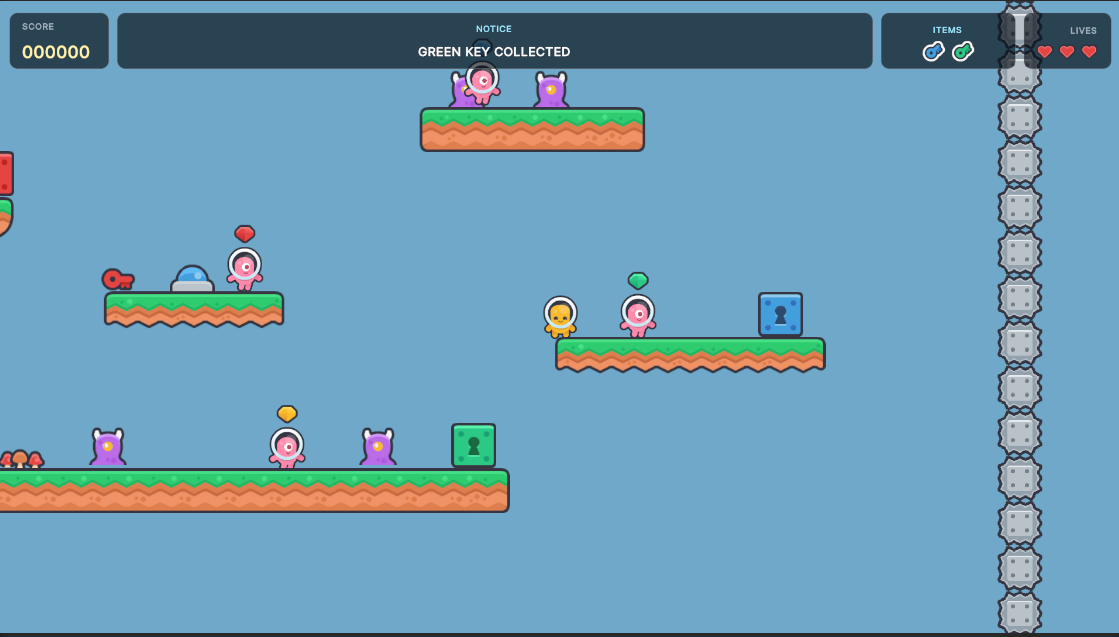
The screenshot shows lockboxes, the translucent HUD, meanies running around, and customers with package colour indicators above their heads. It is still very much a test level, but it is starting to look less like isolated mechanics and more like an actual game space.
Focus: Cleaning up the main menu and pause flow, adding proper player spawn and respawn points, and chasing down the player catching on platforms issue.
Yesterday afternoon turned into a properly epic session. I went ahead and completed the major game flow: key to unlock, unlock to pickup, pickup to deliver.
I also added a safe timer for the player after they lose a life, which ties into the Game Over flow. Speaking of which, I revamped both the mainMenu and gameOver scenes. They are still not 100%, and eventually I want a scrolling game level behind the main menu, but they now feel much more like they belong to the same game.
Another small issue got cleared up too. After unlocking the package lockers, some of the replacement graphics were solid to the player while others were not. I made them all solid, which means they now block both the player and the meanies. For now, the player has to jump onto the opened locker to collect the package. Ultimately I want the package to fly towards the player and auto-collect, but that can wait.
The focus now is to start picking one or two items at a time and getting them properly working, while also starting to shape the actual levels. The scary unknowns are shrinking. The work is becoming more about finishing, tuning, and making the game feel good.
For the morning of 3rd June, the plan was to tackle the main menu About and Quit buttons, add an in-game pause menu, and take another look at the player sticking on platforms.
The About modal turned out not to be a huge deal. I may even be starting to understand this Unity UI Toolkit stuff. It is still not something I would want to do as a full-time job, but progress is progress.
After that, I decided to implement the in-game pause menu, which should put the main GUI requirements mostly to bed. Of course, that means they will probably be up and around causing havoc like Gremlins fed after midnight by tomorrow. Still, the pause menu is useful already. I see so many tweak points while playtesting, and being able to pause makes it much easier to jot things down instead of trying to remember them while dodging tiny pink menaces.
While tracking down the player getting caught on platforms bug, I realized I had never actually made a proper playerSpawner object. I had mostly just thrown the player into the scene and carried on. I thought creating the spawner/respawn structure would be a quick ten-minute task, but a little bad planning on my part, plus Egotist playing on Amazon Music, distracted me from the job at hand. Got it working in the end though.
The new setup is cleaner. A level can have a playerSpawner for the initial start location, and larger levels can also have playerRespawnPoint objects so the player does not get sent all the way back to the start after getting whacked near the end of a long route.
The sticking issue still did not fully go away at first, so I built a Windows version to check whether it was just Unity being awkward in the Editor or a real issue. The build still flaked out in the same way, so it was a true gameplay problem rather than editor nonsense.
In the end, I changed the player over from a box collider to a capsule collider. That appears to have resolved the issue, so I suspect the sharp corners of the box collider were catching on the platform edges. Platformer collision is one of those things that sounds simple right up until the player starts behaving like they have sticky feet.
Focus: Starting the real Level 01, adding meanie variety, locking the background to the camera, and introducing environmental warnings.
Yesterday after the daily entry was written, I went ahead and started working on the new Level 01. Level design is likely to be one of the hardest parts of the development process, because now all the systems need to stop being test pieces and start becoming an actual game.
The goals today are not overly difficult: start making a new level that can ship with the game rather than the test bed I have been using, add some more meanie types to the mix, and start thinking about in-game environmental factors that can affect the player.
I already have a spawner that can change a number of things that might eventually affect the player, but for now those systems are mostly tied to writing logs and posting HUD notices. The foundation is there, even if the actual wind, rain, snow, heat, and other nonsense still needs to be built properly.
The meanieSpawner was not much of a headache. It only needed a quick code update with some spawn options, so now a spawner can either use one fixed meanie prefab or randomly select from a list of meanie types. That gives me much more flexibility when placing meanies in levels.
While thinking about meanies, I also designed a new future idea: slowplayMeanieSpawner. The idea is that it triggers after a configured amount of time if the player is not moving quickly enough. The spawned meanie would be immune to almost everything except the player and player-fired projectiles, and it would be able to fly over the environment. That one is only a design note for now, but it feels like a good way to add pressure later without forcing it into the early levels.
Anyway, the updated meanieSpawner was not a huge deal in the end. I can now have a spawner release one specific meanie or select one from a list. The meanie variants themselves will need a little TLC later, but the spawning side is doing what it needs to do.
Next on the list was getting the gameplay background to behave like a static image. I added a background to the level earlier and it moved along with everything else. It looked great, but it was not the look I wanted. I wanted the level to scroll while the clouds stayed locked behind everything.
Turns out that was easier than expected. I added the background image as a child of the Main Camera, and now it stays static while the level scrolls over it. That one change immediately gave the world a lot more depth. The game stopped looking like sprites floating in blue soup and started looking more like an actual place.
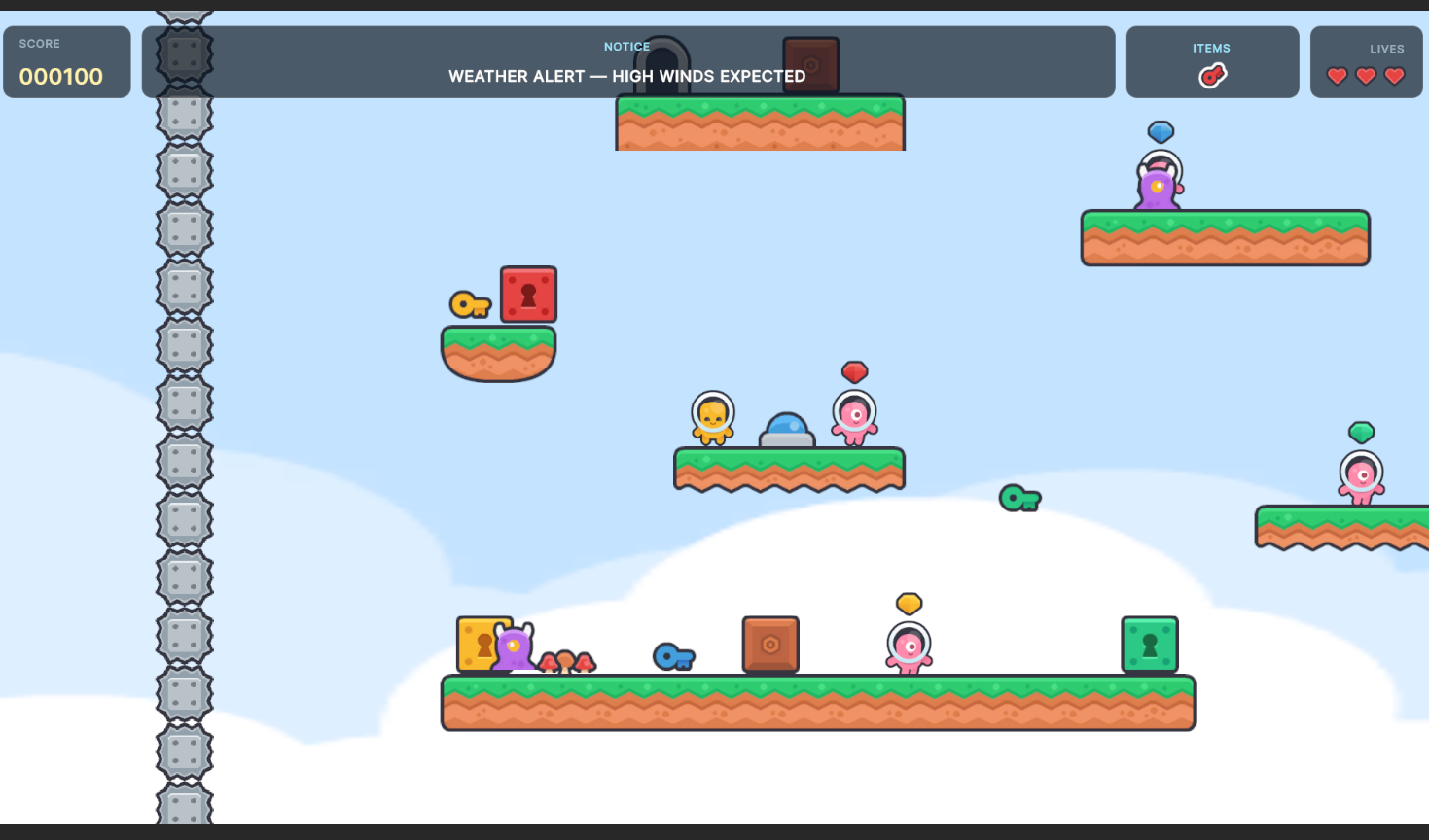
I also implemented the environmentalSpawner. Right now it warns of an impending environmental impact and then fires off a HUD notice. I was thinking that warm and sunny followed by snow seemed unlikely, then I remembered where I live and realized that is entirely possible.
The environmental messages should not fire too often. A few times per level is probably enough. Maybe five minutes between events, maybe less, maybe more. It is one of those things that will need to be tested and tweaked once real levels exist.
At this point the systems are starting to support level design instead of getting in the way of it. The meanie spawners are more flexible, the background gives the scene depth, and the environmental spawner gives the game world a bit of personality even before the actual weather mechanics exist.